
Live connection
Real-time metadata
Connects directly to your BusinessObjects server and reads metadata live: folders, reports, universes, connections, schedules, groups and users.
Enterprise intelligence for SAP BusinessObjects
IntelliBOBI brings AI-powered discovery, comparison and governance to every report, universe and schedule in your landscape, without changing a single one.
Found 11 reports across TEST and PROD. Here is the chain for the first one:
Illustrative sample data. Read left to right for dependencies, right to left for impact.
The answers already exist in your landscape. Finding them is the work.
None of this is a technology limit. It is a visibility gap, and it grows with every report, universe and environment you add.
Multiple consoles and manual navigation to answer one simple question.
Hours spent tracing what a report, universe or connection actually touches.
No fast, reliable way to see what really changed between TEST and PROD.
Issues surface after go-live, when they are most expensive to fix.
A dedicated application that works alongside BusinessObjects. Not a replacement, not a migration, and not a change to your platform.
Real-time metadata
Connects directly to your BusinessObjects server and reads metadata live: folders, reports, universes, connections, schedules, groups and users.
Zero impact on BusinessObjects
Syncs a local, offline catalog for instant search and cross-environment comparison. Nothing is ever changed in your SAP system.
On-premise AI only
Type a question in plain English and go straight to the answer. It runs entirely on your own server.
IntelliBOBI is 100% read-only against BusinessObjects, so it is safe to run against Production from day one.
The fastest path from question to answer in your SAP BusinessObjects platform. No filters, no SQL, no training required.
Ask runs on your own server, so no data goes to an external AI service. It works for administrators and analysts alike.
Explore Ask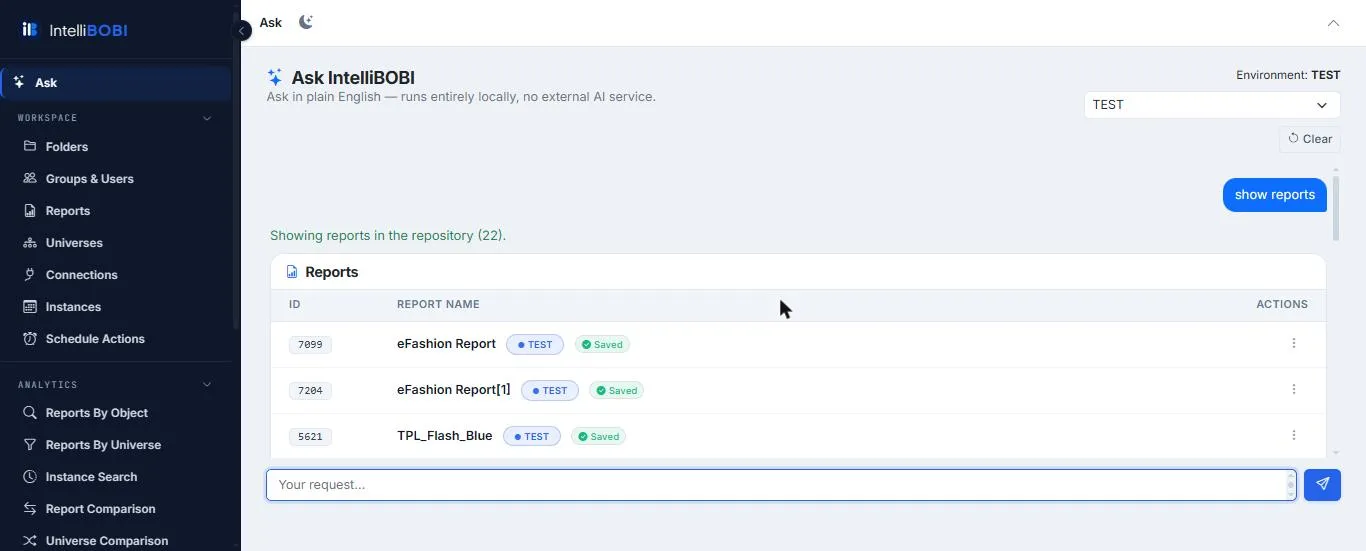
See what is in your landscape before issues become surprises.
Discover and analyze every WebI report in the landscape.
Understand universe usage, structure and details.
Review every BusinessObjects connection in use.
Inspect schedule instances and run history.
Trace which reports use which universes and objects.
Compare environments and content side by side.
AI-assisted discovery replaces four manual routines.
Traditional approachMultiple screens, manual navigation
With IntelliBOBIOne unified view, AI-assisted discovery
Traditional approachHours spent tracing dependencies by hand
With IntelliBOBIImpact analysis in seconds
Traditional approachDifficult, error-prone environment comparisons
With IntelliBOBIAutomated field-level comparison across six entity types
Traditional approachIssues discovered after go-live
With IntelliBOBIIssues caught before they reach production
Based on a typical enterprise landscape of 1,600+ WebI reports across 20 to 40 universes. See the full migration economics.
Monitor schedules and instances, and troubleshoot faster.
Analyze reports, universes, objects and connections, and see the impact of a change.
Inventory the environment and find reports, universes and objects faster.
Compare environments and review dependencies before, during and after a move.
IntelliBOBI is an AI-powered application for SAP BusinessObjects. It catalogs every report, universe, connection and schedule in your landscape, lets you search it in plain English, traces dependencies and compares environments such as TEST and PROD. It is 100% read-only and runs on your own server.
No. IntelliBOBI is 100% read-only against BusinessObjects. It reads metadata and never writes to your SAP system, so it is safe to run against Production from day one.
No. The Ask AI search runs entirely on your own server. No data is sent to an external AI service, and an independent security review confirmed the product is strictly read-only with nothing leaving your network.
Folders, WebI reports, universes, connections, schedules and instances, groups and users, plus the dependencies between reports, universes, objects and connections.
Yes. Six comparison engines (folders, reports, universes, connections, schedule instances, and groups and users) show a color-coded, field-level diff between any two environments, and you can export it to Excel.
Book a 30-minute walkthrough. We run it against your own BusinessObjects landscape, and you do not need to prepare anything.
A 30-minute walkthrough using your own environment. Nothing to prepare on your side.
AI-powered. Read-only. Ready today.
Answers from IntelliBOBI documentation only